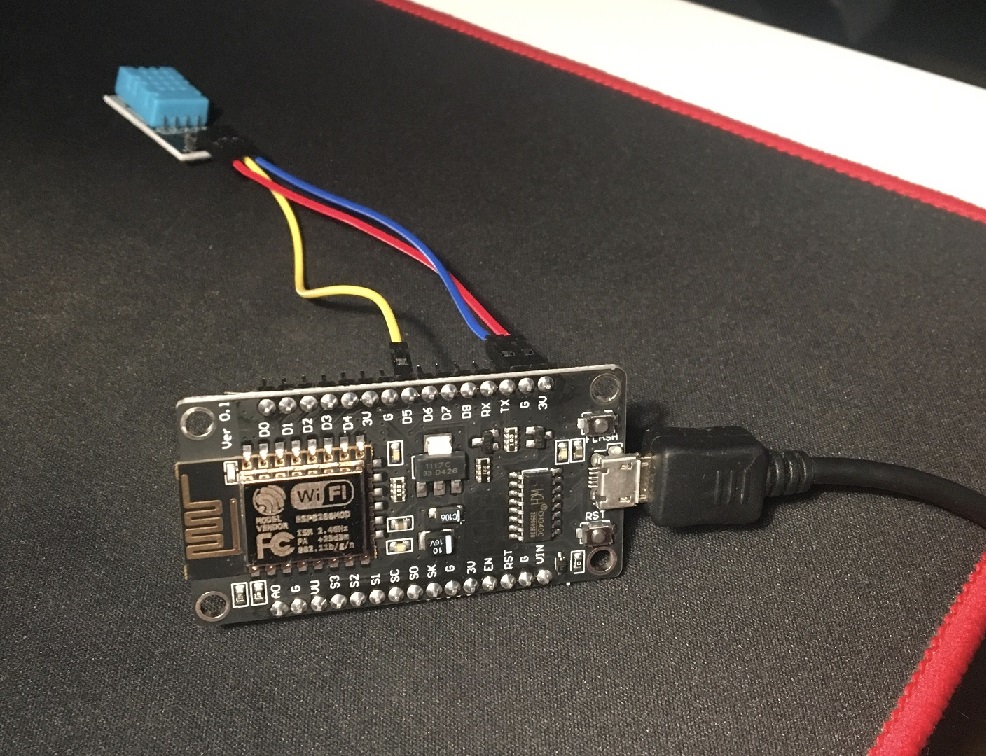
Firstly, I've bought the ESP8266 microcontroller with a WiFi module NodeMCU v3, and a temperature and humidity sensor.
I've installed the firmware, using a NodeMCU flasher, connected the sensor, and written the code (in Arduino IDE) that connects the controller to the Internet (via WiFi), reads the data, and sends it to my database.
#include <ESP8266WiFi.h>
#include <ESP8266HTTPClient.h>
#include "DHT.h"

// Settings for the sensor
#define DHT11PIN 2
#define DHTPIN 14
#define DHTTYPE DHT11
DHT dht(DHTPIN, DHTTYPE);

// Settings for the WiFi
const char* ssid     = "ssid";
const char* password = "password"; // wifi
WiFiClientSecure wifiClient;

// Where to send the data
const char* serverUrl = "https://url_to_script.php";

void setup() {
  // Connect to the network
  WiFi.begin(ssid, password);

  // Wait for the Wi-Fi to connect
  while (WiFi.status() != WL_CONNECTED) {
    delay(1000);
    dht.begin();
  }

  wifiClient.setFingerprint("AA:AA:AA:AA:AA...");

  // Turning off the certificate validation:
  // wifiClient.setInsecure();
}

void loop() {
  // Reading temperature or humidity takes about 250 milliseconds
  float h = dht.readHumidity();
  // Read temperature as Celsius
  float t = dht.readTemperature();

  // Check if any reads failed and exit early (to try again).
  if (isnan(h) || isnan(t)) { // || isnan(f)
    Serial.println(F("Failed to read from DHT sensor!"));
    return;
  }

  if (WiFi.status() == WL_CONNECTED) {
    HTTPClient http;

    // Open the connection
    http.begin(wifiClient, serverUrl);
    // Specify content type for JSON
    http.addHeader("Content-Type", "application/json");

    // Prepare the payload
    int valueToSend = changing;
    String payload = "{\"pHumidity\":" + String(h) + ",\"cTemperature\":" + String(t) + "}";

    // Send POST request
    int httpResponseCode = http.POST(payload);

    // Print response
    if (httpResponseCode > 0) {
      Serial.println("POST Success");
      Serial.print("Response Code: ");
      Serial.println(httpResponseCode);
      Serial.println("Response: ");
      Serial.println(http.getString());
    } else {
      Serial.println("POST Failed");
      Serial.print("Error Code: ");
      Serial.println(httpResponseCode);
    }

    // Close connection
    http.end();

  } else {
    Serial.println("WiFi not connected");
  }

  // Send the data every minute or so
  delay(59500);
}
There was a problem with sending the data, because of the strict HTTPS setting on my server. I've used http requests sending via curl in order to find the problem.
It turned out that the SSL/TLS verification didn't work, because NodeMCU doesn't have (unlike browsers) built in verification via CA. The fingerprint for the SSL certificate had to be entered manually.
Code of the script to read the data:
<?php
$servername = "sql server";
$username = "user";
$password = "pass";
$dbname = "db";


// Set the content type to JSON
header('Content-Type: application/json');

// Read the incoming JSON payload
$data = json_decode(file_get_contents('php://input'), true);

// Extract the integer value from the payload
if (isset($data['cTemperature'])) {
 try {
   $conn = new PDO("mysql:host=$servername;dbname=$dbname", $username, $password);
   $conn->setAttribute(PDO::ATTR_ERRMODE, PDO::ERRMODE_EXCEPTION);

   $query = $conn->prepare("INSERT INTO data (date, humidity, temperature) VALUES (:date, :humidity, :temperature)");
   $query->bindParam(':date', date("Y-m-d H:i:s"));
   $query->bindParam(':humidity', $data['pHumidity']);
   $query->bindParam(':temperature', $data['cTemperature']);

   $query->execute();
 } catch(PDOException $e) {
   echo $e->getMessage();
 }

} else {
   // Handle missing value
   echo json_encode(["error" => "Invalid data received"]);
}
?>
The table looks like this:
| id | date | humidity | temperature |
|---|---|---|---|
| 2 | 2024-12-11 13:01:16 | 64 | 22.3 |
| 3 | 2024-12-11 13:00:15 | 64 | 22.4 |
It's a Python Flask application. It retrieves data from DB, creates plots as a base64 data stream and displays them.
The form to select dates sends a POST request to regenerate the plots with data within the dates. AJAX refreshes the plots.